SSE Executive Education · IMP Programme · April 7, 2026
AI in Practice
From understanding to action
Presenter Magnus Gille
Company Magnus Gille Consulting
Format 3-hour webinar
About

About me

Magnus Gille
Magnus Gille
AI Practitioner · Magnus Gille Consulting
Focus Practical AI adoption — making it work, not just talking about it
Clients Executive teams, professional service firms, industrial companies
Daily use I use AI tools extensively — this is practitioner knowledge, not theory
Contact [email protected] · gille.ai
01
Opening exercise
The Technological
Richter Scale
Before we get started — where do you think AI lands?
Exercise

The Technological Richter Scale

Cast your vote — results update live for everyone in the room

1–5
From shower thoughts to category-leading products — Cool Ranch Doritos, leading windshield wiper brands
not AI
6
Post-it notes (low end) → VCR (high end) — disrupts a field, ripple effects beyond
Field-disrupting
7
Invention of the decade — credit cards (low end) to social media (high end)
of the decade
8
Invention of the century — cars, electricity, the internet
of the century
9
Invention of the millennia — fire, the wheel, agriculture, the printing press
of the millennia
10
AI takeover, technological singularity — ends the Holocene
of the Holocene

Scale adapted from Nate Silver · On the Edge, 2024

Agenda

Three hours — here's the plan

01
The Point and the Curve
Development pace, METR, GDPval
~25 min
02
How AI Works
Mental model, key concepts
~20 min
03
AI in Practice
Prompting, best practices, pitfalls
~25 min
Break · 10 min
04
AI Tools
Landscape, Copilot, Claude, security
~25 min
05
AI Agents
What's next, risks, oversight
~15 min
06
Change Leadership
AI enablement, strategy, foundations
~25 min
02
Development pace
The Point
and the Curve
Most confusion about AI comes from looking at where we are instead of how fast we're moving.
The Curve
Andrej Karpathy

"The majority of the ruff ruff is people who look at the current point and people who look at the current slope."

— Andrej Karpathy, Jan 2026  ·  Former AI lead at Tesla, co-founder OpenAI

The Point

"AI makes mistakes. It can't do what I need. It's overhyped."

→ Looking at today's limitations

The Slope

"Capabilities are doubling every few months. What's impossible today may be routine in a year."

→ Looking at the rate of change

The Curve

Eight years that changed everything

2017 Google publishes "Attention is All You Need" — the Transformer architecture that powers modern AI. Barely noticed at the time.
2022 ChatGPT launches. 1 million users in 5 days — fastest product adoption in history. The model cannot count the letter "r" in "strawberry".
2023 GPT-4 passes the bar exam (top 10%) and the medical licensing exam (86% — passing is 60%). Previous models failed both.
2024 First reasoning models arrive. They now solve the strawberry problem. Multi-step logic improves dramatically.
2025 AI solves Erdős math problems unsolved for 30+ years. GDPval shows models matching or exceeding expert humans on ~47% of economically valuable tasks.
2026 The agentic shift. AI moves from answering questions to taking actions. Claude Code and OpenClaw (100k GitHub stars in weeks) signal a new era — AI that doesn't just respond, but does.
The Curve
METR · Model Evaluation & Threat Research
How long can AI work on its own?

An independent lab that gives AI agents real, open-ended tasks — and measures how complex those tasks can be before the AI starts failing.

The metric
Task time horizon — the longest task (measured in human hours) where the AI still succeeds 50% of the time.
Why it matters
Accuracy scores tell you if AI can answer a question. Task horizon tells you if AI can do a job — unsupervised, start to finish.
The finding
This horizon has been doubling every ~4 months since 2019. GPT-2 managed seconds. Current models manage hours.
The Curve
GDPval · OpenAI · 2025
Not an academic test.
AI vs. the actual expert — judged blind.
71%
win or tie rate for the best model
against domain professionals on real work tasks
1,320 tasks drawn from 44 real occupations
Each task: hours of expert professional work
$3 trillion in annual wages represented
The Curve
GDPval · Win rate vs. human expert (chronological)
Wins only
Wins + Ties
50% parity
May 2024
GPT-4o
9.9%
12.3%
Mar 2025
Gemini 2.5 Pro
23.3%
25.5%
Apr 2025
o4-mini high
25.3%
27.8%
Apr 2025
o3
30.8%
34.1%
May 2025
GPT-5
34.8%
38.0%
Jun 2025
Grok 4
21.1%
24.3%
Aug 2025
Claude Opus 4.1
43.6%
47.6%
Sep 2025
Claude Sonnet 4.5
42.5%
50.3%
Nov 2025
Gemini 3 Pro
40.3%
53.5%
Nov 2025
Claude Opus 4.5
45.5%
59.6%
Dec 2025
GPT-5.2
49.7%
70.9%
1,320 tasks · 44 occupations · $3 trillion in wages covered evals.openai.com/gdpval
The Curve

The Jagged Frontier

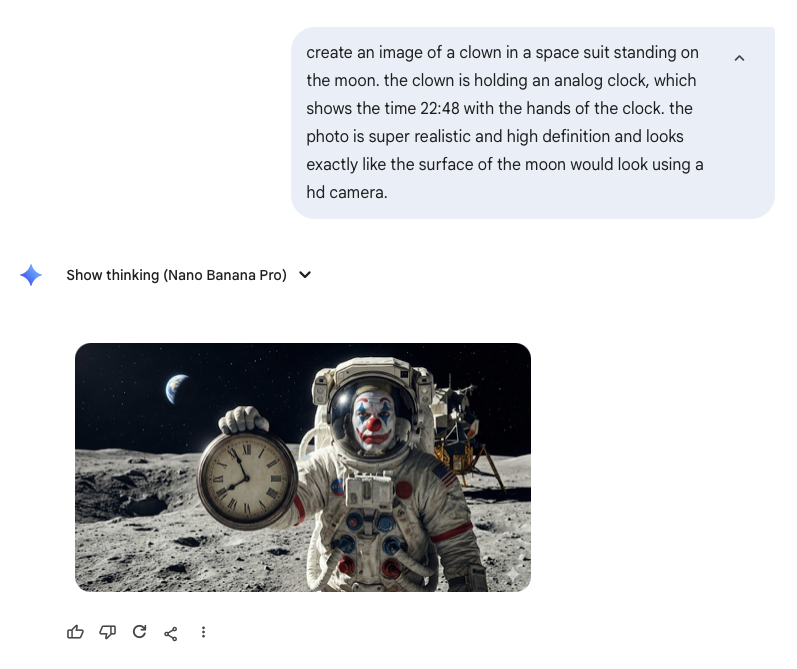
AI is not uniformly capable. Centaurs and Cyborgs on the Jagged Frontier (Ethan Mollick) coined the term: AI can solve hard problems but fail on seemingly trivial ones. The line is jagged and unpredictable.

Clown at a clock — jagged frontier illustration Jagged frontier chart — Ethan Mollick
Recent example

"I want to wash my car. The car wash is 50 metres from my house — should I walk or drive?" — AI often recommends walking. It misses the point that you need the car at the car wash.

03
Technology
How AI Works
You don't need to know how to build it.
You need a mental model good enough to use it well.
How AI Works

Two phases: Learning and Thinking

Training — building the model

  • Data: Enormous amounts of text — books, websites, code, scientific papers. Frontier models train on ~10–15 trillion tokens — the equivalent of all published books in the world.
  • Cost: Hundreds of millions of dollars. Thousands of specialised chips, running for months.
  • Result: A model that has learned statistical patterns in language. Not "knowledge" in the human sense — extremely sophisticated pattern matching.
  • Happens once (then fine-tuning, updates). The model you talk to is frozen.

Inference — using the model

  • When you send a message, your text goes to servers running the model.
  • The model generates a response token by token — roughly word by word — based on probabilities.
  • Each response is stochastic — the same question can yield different answers.
  • The model has no memory between conversations (unless given one explicitly).
  • It cannot look things up — it can only reason about what was in its training data.
How AI Works

Five concepts worth knowing

ConceptWhat it meansWhy it matters for you
Token The smallest unit the model processes — roughly ¾ of a word in English Longer documents cost more and may hit limits
Context window How much text the model can "see" at once — its working memory. Claude: 200k tokens ≈ 600 pages. Gemini: 2M tokens ≈ thousands of pages — an entire document archive. Large documents may need chunking; context affects quality
Hallucination When the model generates text that sounds correct but is invented. Not a bug — a fundamental property of how these models work. Always verify facts, citations, and specific numbers
Training cut-off The model only knows what existed in its training data. It cannot distinguish "I don't know" from "this hasn't happened yet." Recent events are unknown; the model may confabulate
Temperature Controls how creative vs. predictable the output is. Low = deterministic. High = varied. Some tools let you adjust this; matters for creative vs. precise tasks
How AI Works

Model vs. Tool — important distinction

The Model

The underlying AI engine. Examples: GPT-5, Claude Opus 4.6, Gemini 3 Pro.

This is the intelligence — built and maintained by AI labs.

The Tool / Interface

The application you use. Examples: Microsoft Copilot, Claude.ai, ChatGPT, Gemini.

This is the product — with features, pricing, and data policies layered on top.

Why this matters: Microsoft Copilot can run on different models underneath — including Claude. The tool you're paying for and the model doing the thinking may be from different companies.

04
Prompting
AI in Practice
The quality of the output depends almost entirely on the quality of what you put in.
Prompting

Rule #1: Give context

AI has no background knowledge about you, your company, your role, or your constraints. The more relevant context you provide, the better the result. Tell it who you are, what you're trying to achieve, and what the output will be used for.

Without context

Write a good summary of our Q1 performance. Make sure it is easy to read.
[attaches file]

With context

I'm a divisional manager at a heavy equipment manufacturer. Write a one-page Q1 summary for our management board. Good means: data-led, 3 clear takeaways, no jargon, ends with a recommendation. Easy to read means: short paragraphs, headers, suitable for senior leaders who will skim it in under 2 minutes. Tone: direct and confident, not defensive.
[attaches: Q1 report · Q1 last year · last board summary · board template]

Useful framing: Think of AI as a highly capable new colleague who knows nothing about your organization, your industry, or your specific situation. Brief it accordingly.

Prompting

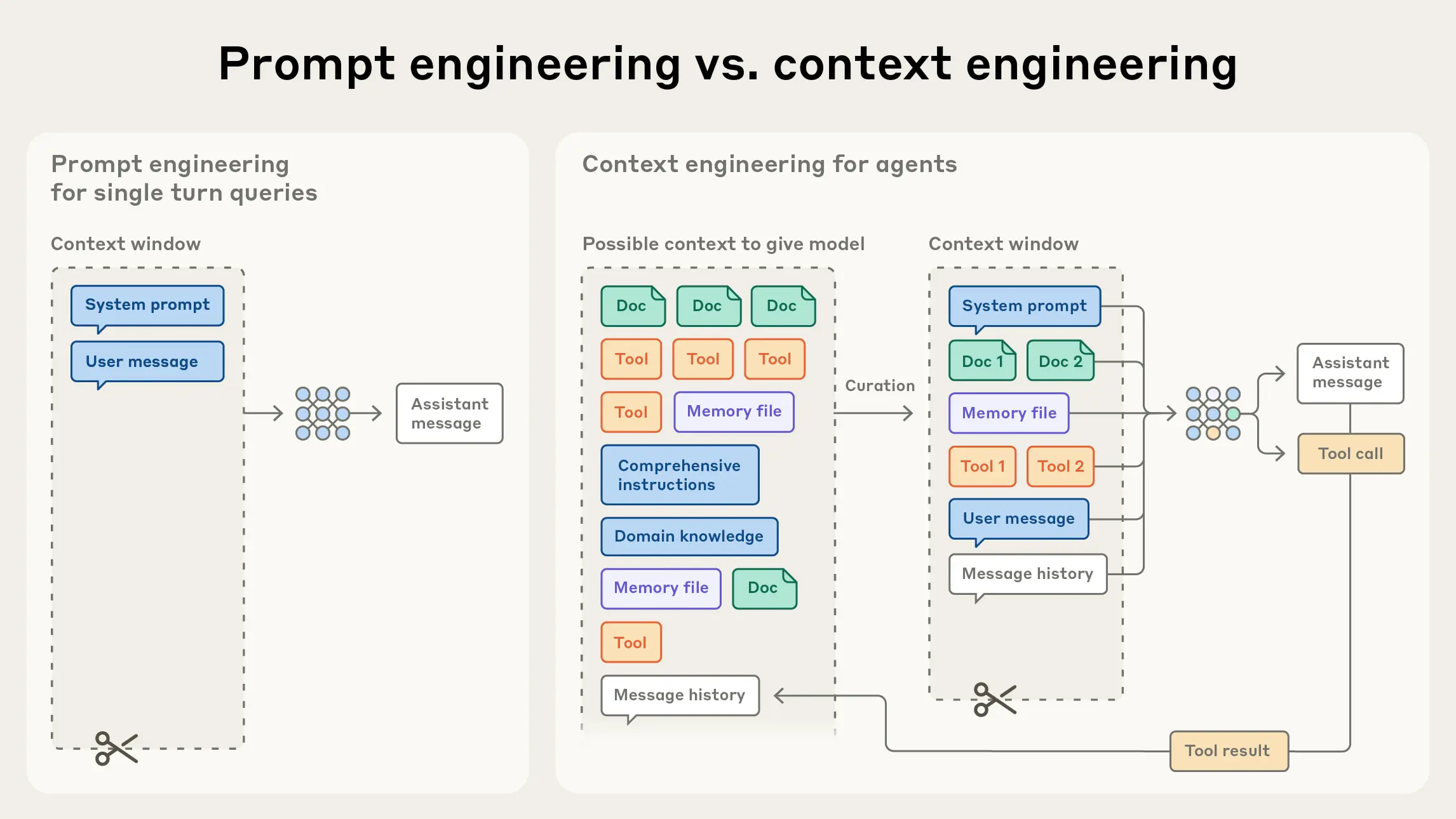
Context Engineering

Context Engineering — Anthropic

Source: Anthropic

Prompting

Eight techniques that work

01

Be specific about "good"

Show an example of the format you want. Few-shot examples dramatically improve output quality.

"Write a 3-sentence executive summary. Lead with the conclusion, follow with evidence, end with the recommended action."
02

Manage hallucinations

Ask it to flag uncertainty: "If you're unsure, say so." Verify facts, citations, and numbers independently.

"Summarise the key trends in Nordic logistics. Mark anything you're uncertain about with [UNCERTAIN] so I can verify it."
03

Use neutral language

Avoid leading questions. "Is this a good idea?" invites agreement. "Give me pros and cons" invites analysis.

Instead of "Don't you think we should expand to Germany?" → "What are the strongest arguments for and against expanding to Germany right now?"
04

Specify your audience

"Explain for a senior executive without a technical background" vs "Write for a specialist." Radically different outputs.

"Explain what an LLM is. My audience is a board of directors — no technical background, very time-pressed. Max 4 sentences."
05

"Interview me"

Instead of writing the perfect prompt: "Ask me questions one by one until you have enough context to write the report."

"I need to write a change management plan for a new ERP rollout. Ask me questions one by one until you have what you need."
06

AI as thinking partner

"What complications might I be missing?" / "Argue against this plan." / "What should I ask that I haven't?"

"We're planning to cut headcount by 15% in Q3. Argue against this decision as strongly as you can."
07

Braindump

Dump messy notes, voice transcripts, or bullet points and ask AI to structure them. It's excellent at finding order in chaos.

"Here are my rough notes from today's client meeting: [paste]. Structure into: decisions made, open questions, next actions with owners."
08

Let AI improve your prompt

"I asked X and got Y, but wanted Z. Help me rewrite the prompt." AI is often better at writing prompts than humans.

"I asked you to write a strategy memo but it was too generic. Here's what I got: [paste]. Rewrite the prompt so I get something sharper."

Prompting

Handling hallucinations

Hallucination is not a bug that will be fixed — it's a fundamental property of how language models work. They generate plausible-sounding text. Plausible ≠ true.

  • Ask it to flag uncertainty: "Mark anything you're unsure about with [UNCERTAIN]"
  • Ask it to cite sources — then verify them independently
  • Use a fresh conversation to review its own work. In the same context it tends to defend its reasoning — a new context is more critical
  • For factual claims: always verify with authoritative sources
Verification prompt

Review the response I've pasted below. Flag any factual claims that could be wrong or that I should verify. List them as: Claim → Why to verify → How to verify.

The rule: Trust AI for reasoning, structure, and synthesis. Verify AI for facts, figures, and citations.

Workshop · 1 of 2
5 min
Try it with your own business challenge.
01 Open the AI tool you use (Copilot, Claude, ChatGPT — any of them)
02 Think of a real challenge from your work — a decision you're facing, a document you need to write, an analysis you want to run
03 Apply Rule #1: write a prompt that gives full context — who you are, what the challenge is, what you want the output to look like
04 Run the prompt. Note what worked and what surprised you.
Workshop · 1 of 2 · Group discussion
5 min
Share in small groups — what happened?
What worked better than expected?
What didn't work or surprised you?
Would you have written the prompt differently with hindsight?
One insight per group to share with everyone
10-Minute Break
Back at [time + 10]

Coming up: AI tools, data security, agents, and change leadership

05
Landscape
AI Tools
Overview
There are many tools — the right one depends on your use case, your company's data policy, and what you're already paying for.
Check-in

What are you already using?

Click everything that applies — results are live.

ChatGPT
OpenAI
Copilot
Microsoft
Claude
Anthropic
Gemini
Google
Perplexity
Perplexity AI
GitHub Copilot
Microsoft · for code
Grok
xAI
NotebookLM
Google
Something else
Mistral, etc.
Nothing yet
Just getting started
AI Tools

The major tools

Microsoft Copilot
Microsoft · GPT-5 or other models

Integrated into Microsoft 365 — Word, Excel, Teams, Outlook. The enterprise tool for organizations already on Microsoft. Strong for Office workflows, meeting summaries, email drafting.

ChatGPT
OpenAI · GPT-5

The most widely known tool. Strong general capability, image generation, code. ChatGPT Enterprise meets corporate data requirements. Consumer tiers do not.

Claude
Anthropic · Claude Opus 4.6 / Sonnet 4.6

Known for nuanced writing, long document analysis, and careful reasoning. Claude.ai Teams plan has strong data protections. No training on your data.

Gemini
Google · Gemini 3 Pro

Largest context window (2M tokens). Deep integration with Google Workspace. Gemini for Workspace enterprise plan for data protection.

Perplexity
Perplexity AI · Multiple models

AI search engine with cited sources — reduces hallucination risk for current information. Good for research tasks where source verification matters.

Specialized tools
Various vendors

Industry-specific tools: Harvey (legal), Glean (enterprise search), Notion AI (knowledge management), GitHub Copilot (code). Growing rapidly.

AI Tools

Microsoft Copilot — for those already using it

Where it lives

  • Word: Draft documents, rewrite sections, summarise — directly in the document
  • Excel: Analyse data, generate formulas, create charts from natural language
  • Teams: Meeting summaries, action items, catch-up on missed meetings
  • Outlook: Draft replies, summarise email threads, prepare for meetings
  • PowerPoint: Generate presentations from briefs, reformat slides

Getting more from it

  • The same prompting principles apply — context is everything
  • Use Copilot Pages to collaborate on AI-generated content with your team
  • Copilot Studio lets organizations build custom agents (IT/admin function)
  • Connect to your company's SharePoint/Teams content for context-aware answers

Practical starting point: Use it first in Teams meetings (meeting recap) and Outlook (draft reply). These are the fastest wins with the lowest risk of hallucination — it has access to the actual context.

06
Governance
Data & Security
The most important question your legal and IT teams will ask: where does our data go?
Data & Security

Consumer vs. Business vs. Enterprise

Tier Training on your data? Data handling Example plans
Free / Consumer Yes by default Conversations may be reviewed by humans; used for training Claude Free, ChatGPT Free, Gemini Free
Individual paid Yes by default — can opt out Still consumer-grade terms; opt-out is per-user Claude Pro/Max, ChatGPT Plus, Copilot Pro
Business / Team No Commercial terms; data not used for training; admin controls Claude Team, ChatGPT Team, Copilot M365
Enterprise / API No DPA available; SSO; audit logs; data residency options Claude Enterprise, ChatGPT Enterprise

Critical: Paying for an individual plan (e.g. Claude Pro, ChatGPT Plus) does not automatically protect your data. Individual plans are consumer-grade. Business/Team tier is the minimum for work with sensitive or confidential information.

Data & Security
The real blocker
Data foundations — before the AI conversation
Governance

The question that stalls most AI projects:

"Can we use data X for use case Y in tool Z?"

Who owns the answer? Who is allowed to say yes? Without a clear data governance structure, every AI initiative stalls at the same gate.

AI-ready data

The good news: there is no special "AI readiness."

AI-ready data is simply well-governed, well-structured, digitised data — the same destination as the data quality and digitisation journey your organisation already started. AI makes that journey more urgent, not different.

Data & Security

Where is your data processed?

Geopolitics of data

  • Most frontier AI models are US companies. Data processed in US data centers by default.
  • EU data residency is available — but typically only at Enterprise tier, and only via cloud platforms (AWS Bedrock, Google Vertex, Azure OpenAI).
  • GDPR applies to processing of personal data — even if the vendor is US-based.
  • For regulated industries: check whether a Data Processing Agreement (DPA) is available and required.

Practical question for your IT/Legal: "Do we have a DPA with our AI vendor? Where is data processed? What's the retention period?"

Vendor dependency risk

  • AI capabilities concentrate in a handful of US and Chinese companies
  • Pricing and terms can change rapidly — you have limited negotiating power unless you're large
  • Building workflows that are tightly coupled to one vendor creates lock-in
  • From my own work: I intentionally avoid single-vendor dependency — if one API changes, my workflows should still function
  • Open-source models (Llama, Mistral) can run locally — all data stays on your servers
07
Next step
AI Agents
Moving from question-and-answer to autonomous multi-step work.
AI Agents

From chat to agents

Chat (what most people use today)

  • You send a message → AI responds → done
  • One interaction at a time
  • You control every step
  • AI has no tools — it can only produce text
  • Low risk: output is always text you review before acting

Agents (where it's heading)

  • You give a goal → AI plans and executes multiple steps autonomously
  • AI can use tools: web search, write files, send emails, run code, call APIs
  • Can run for minutes or hours in the background
  • You set the objective and review the result
  • Higher capability — and higher stakes if something goes wrong

Today's examples — early-stage, powerful, but still requiring human oversight at every significant step:

AI Agents

The frontier: agents working together

What builders are deploying right now — not research, not demos. Real systems running on real tasks.

What's being deployed
  • Multi-agent pipelines — one agent plans, others execute in parallel
  • Agents with persistent memory across tasks and conversations
  • Autonomous coding: write → test → debug → commit, without human steps
  • Agent-to-agent review — a second model critiques the first's output
  • Natural language interfaces (chat, Telegram, voice) as the front end to complex workflows
Live example — Grimnir

A personal AI infrastructure project running on a home server — built to explore what agents can do when given real tools and real tasks.

A typical task

Send a Telegram message: "Research X, implement it, test it, then have another agent review the result."

The system researches → writes code → runs tests → spins up a separate model to review the output — all without further human input. The goal: eventually close the loop entirely.

AI Agents

Agents: capability and caution

What becomes possible

  • Automate multi-step research and reporting workflows
  • Monitor information sources and summarise changes
  • Process large document sets autonomously
  • Draft, review, and route documents with human checkpoints
  • Connect to internal systems — CRM, ERP, email — to take action

What to watch for

  • Errors compound: Mistakes in step 1 can cascade through 10 subsequent steps
  • Harder to audit: When did it decide that? Which information did it use?
  • Hallucinations at scale: More documents = higher risk of confused or fabricated information
  • Always keep a human in the loop for anything consequential — especially anything that triggers real-world actions (sends emails, updates records)

The principle: Agents should automate the mundane and reversible before the important and irreversible. Start with read-only tasks. Add write access incrementally, with logging and approval gates.

Workshop · 2 of 2
7 min
Map AI to your work — where does it create value?
01 Think of the 5 most time-consuming tasks in your typical work week
02 For each task: Is this something AI could fully automate, partially assist, or not help with? Use the jagged frontier as a guide.
03 Identify your single highest-value AI use case — the one task where AI help would save the most time or improve quality most
04 What's stopping you from using AI for it today? Tool? Knowledge? Policy? Data access?
Workshop · 2 of 2 · Group discussion
5 min
What did you find?
What was your highest-value use case?
What's the main blocker in your organization?
Is the blocker something you can address, or does it require organizational decisions?
08
Leadership
Leading in the
Age of AI
The technology is not the hard part. The organization is.
Change Leadership

The productivity paradox

Individual

Workers consistently report significant personal productivity gains when using AI. Tasks completed faster, quality improved, new capabilities unlocked.

Org

Organizations report only modest gains in aggregate productivity. The individual benefits aren't translating upward.

Why the gap? — Ethan Mollick

Change Leadership
40%
of workers use AI
secretly at work

Despite official adoption rates of around 20%, surveys consistently show that over 40% of workers are already using AI tools — without telling their managers. They're called "secret cyborgs."

Why they hide it

  • Fear of being seen as cutting corners
  • Uncertainty about company policy
  • Fear of losing credit for their work
  • No clear guidance from leadership

What leaders must address

  • Create clear, enabling policy — not just prohibition
  • Make it safe to experiment and share learnings
  • Reward those who find valuable applications
  • Model AI use yourself as a leader
Change Leadership

The Leadership–Lab–Crowd framework

Ethan Mollick's framework for organizational AI adoption — based on what actually works.

Leadership
Sets direction
  • Paint a vivid picture of what AI-enabled work looks like in your organization
  • Remove barriers to experimentation
  • Build incentives that reward AI discovery
  • Create safe spaces to try things without fear of failure
  • Model AI use yourself
The Lab
Scales what works
  • Dedicated team — turns crowd discoveries into org-wide solutions
  • Rapidly distributes effective prompts and workflows
  • Builds org-specific AI benchmarks
  • Creates demonstrations that spark curiosity
  • Prototypes future capabilities before models are ready
The Crowd
Discovers what works
  • Your employees — the people who actually do the work
  • Best positioned to spot where AI adds value in their specific role
  • Experienced workers are most valuable here — they know the domain
  • Need a safe channel to share what they find
Change Leadership

What leaders need to build

Data foundations

AI is only as good as the data it has access to. Organizations with poor data quality, fragmented systems, or unclear data ownership will struggle to capture AI value.

  • Clean, accessible internal data is a competitive advantage
  • Invest in documentation and institutional knowledge capture now — it will be AI's input
  • Data governance policy: what can AI tools access? What's off-limits?

AI strategy

AI strategy is not the same as "buy some licenses." It requires answering:

  • Where are our highest-value use cases? (Prioritize ruthlessly)
  • What's our stance on risk? Where do we require human review?
  • How do we measure success? Not tool adoption — business outcomes
  • Who owns it? AI adoption without an owner tends to stall
  • How do we develop AI fluency across our organization?

The uncomfortable truth: Most organizations are not AI-ready — not because of the technology, but because of data quality, change management, and unclear ownership. Address these first.

Change Leadership

Practical actions for business leaders

For yourself

  • Use it daily. There is no substitute for hands-on experience. Start with low-stakes tasks.
  • Build your own mental model of what AI can and cannot do — don't rely on others' descriptions
  • Share what you learn with your team — model the behavior you want

For your team

  • Create time and space to experiment — protected from performance pressure
  • Establish a shared channel (Teams, Slack) where people share prompts and discoveries
  • Identify your AI champion — the person on the team most engaged, and give them a role

For your organization

  • Advocate upward for clear AI policy — your people need guidance
  • Push for appropriate tool tier — business/team license, not consumer
  • Connect AI to real business problems — not just efficiency, but growth and quality
  • Approach this as change management: communicate the why, address concerns about job security directly, build trust

"The challenge is not building AI. The challenge is building organizations that can use AI." — common theme across every serious AI adoption study.

09
Wrapping up
Key Takeaways
Takeaways

What to remember

Look at the slope, not just the point. AI will be more capable in 6 months than it is today. Decisions and strategies need to account for the rate of change, not just current limitations.

Context is everything in prompting. The single biggest improvement you can make is giving more relevant background information. Brief AI like a capable new colleague.

Use business-tier tools. Consumer plans do not offer adequate data protection for work involving confidential or sensitive information. Know your vendor's data policy.

The jagged frontier means you need to experiment. There's no substitute for trying. What AI can't do today, it may do in months. What it struggles with is non-obvious until you test it.

Your team is already using AI. If you haven't set policy and created a safe space for experimentation, you have secret cyborgs. Get ahead of it.

Data foundations determine your ceiling. AI is only as good as the data it can access. Poor quality limits what's possible — and unclear governance ("can we use this data in this tool for this purpose?") will block adoption faster than any technical limitation.

Technology is not the hard part. Change management and clear ownership determine whether organizations actually benefit. Address those first.

Questions & discussion
Thank you.

↓ Download PDF

1 / 42